Launching Shoperize Price Calculator on the Shopify App Store
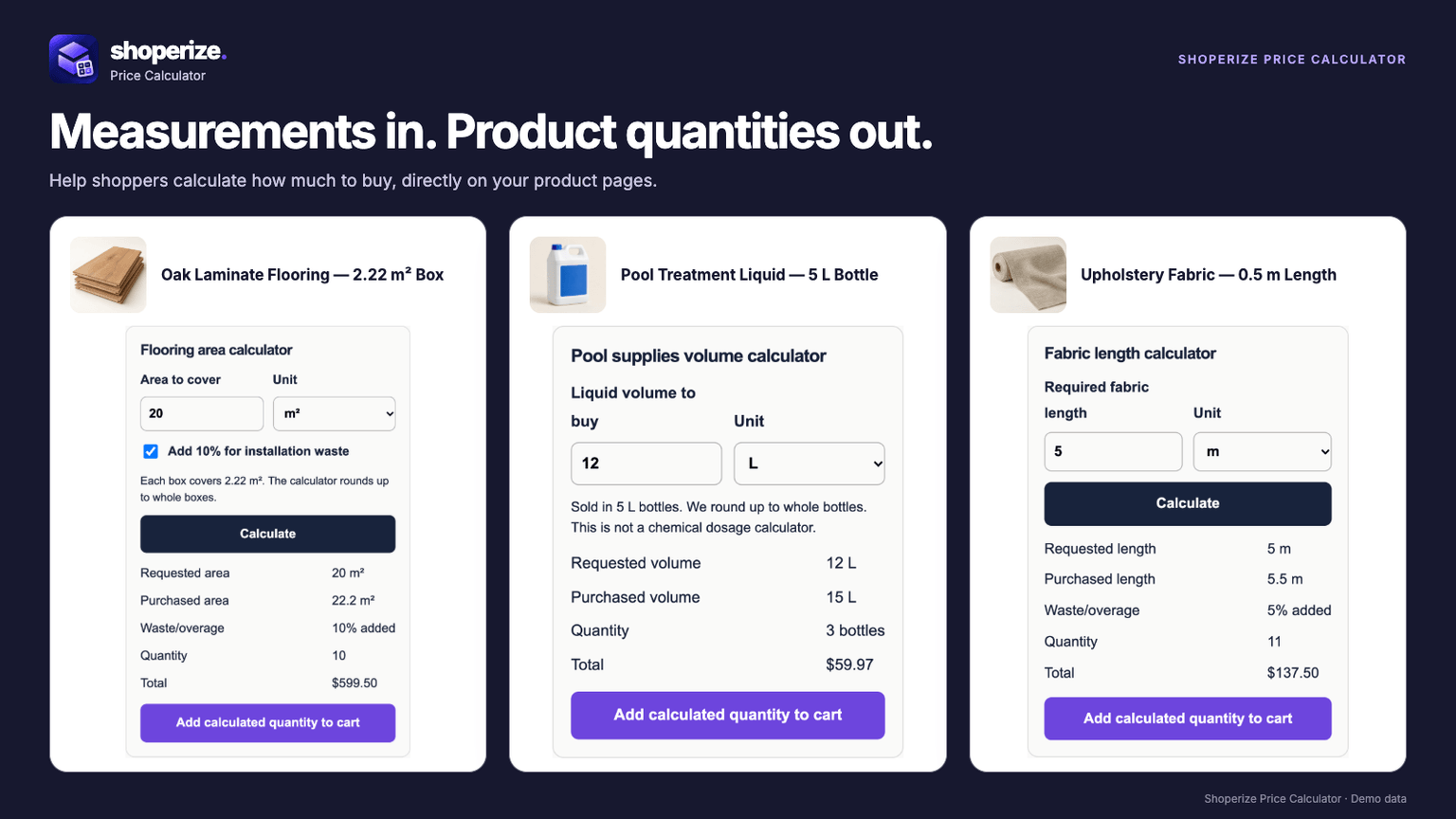
Shoperize Price Calculator is now available on the Shopify App Store. We built it at NextGen Software for merchants selling products customers need to measure before buying: flooring, tile, fabric, rolls and other measured goods.
The app takes the shopper's measurements and works out how many purchasable units belong in the cart. Building that connection shaped the product, from the first input field to the details attached to an order.
A room measurement needs to become an order
A shopper knows the size of their room. A flooring merchant sells boxes. Between those two facts sit several buying rules: coverage per box, installation waste, unit conversion and rounding to whole packages.
Consider an illustrative order for a 12 by 14 foot room. The floor area is 168 square feet. With a merchant-configured 10% waste allowance, the target becomes 184.8 square feet. If each box covers 20 square feet, the shopper needs 10 boxes, supplying 200 square feet.
Nine boxes would cover only 180 square feet, below the target after waste. The product page needs to explain why the result is 10, then add 10 of the correct Shopify variant to the cart. That is the workflow we designed around.
Keeping the calculation connected to Shopify
The core decision was to calculate quantities against the merchant's selling unit. If a product is sold by the box, one unit in Shopify needs to represent one box, with matching coverage and pricing.
Shoperize supports measurement inputs including area, dimensions, length, volume and weight, with capabilities depending on the plan. Merchants configure package coverage, unit conversion, waste, rounding and limits for the products they assign.
Shopify's catalog price remains the basis of the charge. For the flooring example, the displayed product subtotal comes from 10 boxes multiplied by the selected variant's price. We do not describe the app as replacing a line item's price with any arbitrary formula result.
That distinction matters for fulfillment as well as pricing. The quantity in the cart must mean the same thing to the shopper, the merchant and the warehouse.
Making the rules understandable to merchants
A measurement calculator needs setup that reflects how the store actually sells. The merchant editor brings measurement settings, product rules, assignments and appearance controls onto one page, with a preview to check the result.
Recipes provide starting points for common selling models, such as flooring packages and length-based products. Merchants can adjust those rules and, on supported plans, use editable AI-assisted drafts. The merchant still needs to check coverage, units and assignments before publishing.
A useful preview helps answer concrete questions: Does a fractional box round up? Is the waste allowance visible? Does the selected variant match the product being configured? Those details determine whether the calculator's answer makes sense to the person buying.
Carrying the measurement into the cart
The product-page result is only part of the purchase. Shoperize retains measurement details in the cart and updates purchased coverage when quantities change.
Suppose the shopper changes our illustrative flooring order from 10 boxes to 11. Purchased coverage becomes 220 square feet. Their original room measurement is still 168 square feet. Showing those as distinct values helps explain what the order contains.
This was a useful product lesson for us: a calculation can be mathematically correct and still leave the buyer confused if its meaning disappears at the next step. The result, the selling unit and the cart quantity need to stay connected.
What this launch says about building focused software
We have written about building a family of Shopify apps. Price Calculator is a concrete release within that work, centered on a specific merchant task.
For founders planning their own product, the useful starting point is the business rule behind the screen. What does one unit represent? Which inputs does a customer know? What must the final order record preserve? Answering those questions gives the interface, data model and test cases a clearer purpose.
The same approach applies to ecommerce software development more broadly. A small workflow can touch catalog data, pricing, storefront design and fulfillment. Our guide to full cycle software development explains how those responsibilities connect from discovery through launch.
Try Shoperize Price Calculator
If you sell measured products on Shopify, view Shoperize Price Calculator on the App Store. The product website explains the calculator, and the setup guide walks through configuration.
If your business has a buying workflow that needs custom software, book a free discovery call with NextGen Software. We can work through the rules your product needs to handle and the smallest useful version to build first.